Villages GPS
- 4.2
- Rating
- 10.00K
- Installs
- Free
- Price

 Analysis by App-foxy
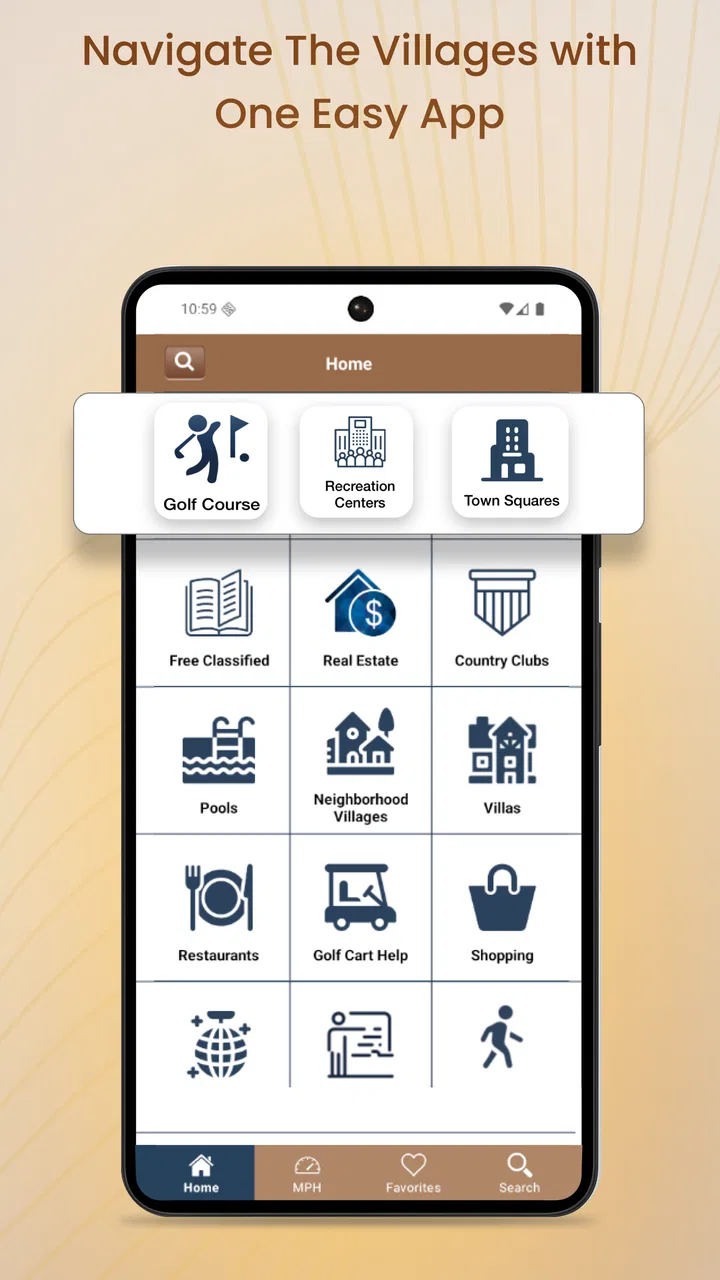
Getting around The Villages by golf cart sounds simple until a route behaves differently from what you expected. A road may be intended for carts rather than regular vehicles, a turn can be easy to miss at a slower pace, and a phone that is mounted poorly can make even a good navigation tool feel unreliable. Villages GPS takes a focused approach to that problem: it is a navigation app built for golf carts and vehicles in The Villages, Florida.
I found the app most interesting because it is not trying to be a general-purpose map for every trip in every place. Its value depends heavily on whether you spend time in The Villages and need guidance suited to local travel. That narrow focus is also its biggest strength. Instead of expecting a broad mapping app to understand the difference between a cart-friendly route and an ordinary driving route, you get a tool aimed at this particular community.
My overall view is that Villages GPS is worth considering for regular local travel, but it rewards a careful setup. The first few minutes matter more than they might with a familiar mapping app. Before relying on voice directions, I would check the phone’s location behavior, sound output, route context, and the way the device is positioned in the cart or vehicle. Those checks prevent many problems that can look like navigation errors.
You May Also Like

 Pandora - Music & Podcasts
Pandora’s Music Is Easy to Start, but Harder to Recover
Pandora’s strength is its low-effort path from a seed to a station. Its weak spot is how much confidence it asks you to place in connection, setup, and quiet recovery.

 AccuWeather: Weather Radar
AccuWeather Review: A Quick, Clear Forecast for Everyday Decisions
For everyday plans, the best forecast is the one you can understand quickly. AccuWeather makes rain timing, radar, and local conditions easy to act on, with a few trade-offs.

 Hill Climb Racing
Why Hill Climb Racing Still Turns Crashes Into One More Run
A tiny car, a bumpy hill and one more upgrade: Hill Climb Racing keeps resurfacing because its simple chaos makes every near-miss feel personal.

 AliExpress - Shopping App
AliExpress Makes Global Shopping Feel Personal, but Shoppers Bear the Risk
AliExpress turns a global marketplace into a pocket-sized discovery engine. Its reach is useful, its shopping loop compelling, and its trade-offs easy to miss.

 Lords Mobile: Kingdom Wars
Lords Mobile Is a Kingdom-Building Routine, Not a Quick Match
A case-by-case verdict on the building, battles, device demands, and social commitments that make Lords Mobile rewarding for some players and exhausting for others.

 PDF Scanner app - TapScanner
TapScanner Makes Paperwork Easier to Capture, Check, and Share
TapScanner makes scanning with a phone feel less like a rescue operation and more like a dependable step in getting work done. Its capture tools are useful, though not flawless.
More From Our News Desk
View All News


Where the real friction begins
The most common difficulty with a specialized navigation app is not necessarily the map itself. It is understanding what the app is designed to do and how that fits your trip. A person who opens it expecting the same coverage and flexibility as a large general mapping service may feel limited. Someone traveling within The Villages, however, may appreciate the tighter purpose.
The app’s store summary describes voice navigation for golf carts and vehicles in The Villages, Florida. That wording sets an important expectation: this is a local route companion, not a universal navigation replacement. If your journey stays within the area and your main concern is following directions without constantly looking down, the concept makes sense. If you need broad travel planning across multiple states, a standard mapping app is likely the better primary tool.
Voice guidance is particularly useful in a golf cart because the driver’s attention should remain on traffic, crossings, pedestrians, and the road surface. I would treat the spoken instructions as support rather than permission to ignore the surroundings. Local roads can involve unusual layouts, and a route that appears logical on a screen still needs to be judged against visible signs and current conditions.
Another point of friction is the difference between a route that is technically possible and one that feels comfortable. A navigation app can guide you toward a destination, but it cannot replace your judgment about weather, visibility, traffic, construction, or whether a particular section feels suitable for your vehicle. This matters even more when a cart is moving at a slower pace and every missed turn takes longer to correct.
Why the narrow focus can be useful
General map apps are excellent when you want a broad directory of places, live business information, walking directions, transit options, or long-distance driving. Their strength is flexibility. Villages GPS has a different appeal: it keeps the experience centered on navigating The Villages by golf cart or vehicle.
That distinction can make the app easier to approach for a resident or frequent visitor. You are not necessarily looking for a worldwide map database; you are trying to get from one local destination to another while receiving directions that suit the way you travel. The more often you make those trips, the more valuable that specialization becomes.
Still, I would not uninstall a general mapping app immediately. I prefer using a broad map for checking a destination’s name, confirming a business location, or planning a journey outside the local area, then using Villages GPS when the actual local movement is the priority. That two-app workflow is more practical than forcing one tool to handle every situation.
Setup checks that prevent avoidable problems
Before starting a trip, I would first make sure the phone has a clear view of the sky or is positioned where it can determine location consistently. A device buried in a bag, blocked by the vehicle, or placed where the screen cannot be seen safely creates confusion. If the position marker seems slow to settle, waiting briefly before moving is better than beginning the route and assuming every instruction will be delayed.
Next, check the phone’s volume rather than assuming the navigation voice will be loud enough. Music, calls, notification settings, or a connected audio device can change what you hear. In a golf cart, wind and road noise can also make a quiet instruction easy to miss. I recommend testing the sound before leaving, especially if this is your first trip with the app.
Phone placement deserves more attention than many people give it. The device should be visible without requiring the driver to look down for long, and it should be secured so vibration does not constantly change the viewing angle. A stable mount also makes it easier to glance at the map when a voice instruction needs visual confirmation.
It is also sensible to begin with a short, familiar journey. This gives you a chance to learn how the app announces turns, how early you need to prepare, and whether the voice is clear in your vehicle. A short test is more useful than discovering a sound or positioning problem halfway through an unfamiliar trip.
Check the trip before moving
I like to pause at the starting point and look at the route as a whole. I am not trying to memorize every turn. I am checking whether the destination is correct, whether the general direction makes sense, and whether the planned path resembles the roads I expect to use. This simple habit catches wrong destination selections before they become a moving-vehicle problem.
If you are switching between a golf cart and another vehicle, take an extra moment to consider whether the route fits that change. The app is intended for both golf carts and vehicles, but your responsibilities as a driver remain the same. A route display should inform your decision, not override road signs, restrictions, or your own assessment of what is safe.
Because the application is free to download, it is easy to install and try without making a purchase decision first. There are in-app purchases listed at twelve dollars and ninety-nine cents per item, so I would review any purchase prompt carefully and avoid assuming that every function is included automatically. The sensible approach is to test the basic experience on a familiar trip before deciding whether an optional item is useful to you.
The app is rated for Everyone, which makes it broadly approachable from an age-rating perspective. That does not remove the need for responsible use: the driver should set the route before moving, keep attention on the road, and let a passenger handle the phone when possible.
Recovering when a route seems wrong
When navigation appears to go off course, I would not immediately conclude that the map is broken. First, stop somewhere safe and compare the phone’s displayed position with the road around you. If the position is still catching up, give it a moment. Moving farther while the location is uncertain can make the recalculation harder to understand.
If the app is giving directions for a destination you did not intend to select, end the trip and enter the destination again rather than repeatedly trying to interpret the existing route. A clean restart is often less frustrating than continuing with a plan that began from the wrong place or used an accidental selection.
Sound problems need a different recovery process. Check the phone volume, confirm that audio is not being sent to another connected device, and make sure the phone is not in a mode that suppresses spoken instructions. If the map position is correct but the voice is missing, that points more toward the phone’s audio setup than the route itself.
For a frozen or unresponsive screen, I would close the app, reopen it, and wait for the location to settle before starting again. Restarting the phone is a reasonable next step if other apps are also behaving strangely. These are deliberately simple measures, but they are safer than troubleshooting while the vehicle is moving.
A useful recovery routine
My preferred routine is: pull over, verify the destination, check the location marker, confirm sound, and then restart the route if needed. This order matters because it separates four different problems that can look similar. A wrong destination, delayed location, muted audio, and a stalled interface each need a different response.
If the route repeatedly behaves unexpectedly in one particular area, compare it with visible road signs and your usual local knowledge. Make a note of the exact location and what happened so you can recognize the pattern later. I would not try to compensate by making abrupt turns or repeatedly tapping the screen while driving.
A passenger can make this workflow much easier. The driver can concentrate on the road while the passenger checks the display, confirms the next turn, or handles a restart after the vehicle is safely stopped. For solo travel, the same principle applies: prepare before departure and pull over whenever the phone needs attention.
When the app may not be the cause
Navigation depends on more than the application. A weak or inconsistent phone connection, an obstructed location signal, low battery, excessive heat, or a poorly positioned device can all affect the experience. If several apps are slow or the phone is struggling generally, changing navigation tools may not solve the underlying problem.
Weather and the physical environment can also influence how comfortable the trip feels. Bright sunlight can make a screen difficult to read, while wind can overpower voice guidance. These are reasons to improve the setup or rely more on a passenger, not automatic proof that the route information is incorrect.
Human expectations are another source of trouble. If you expect every instruction to arrive far in advance, a turn announced at a different moment may feel late even when the route is still usable. A few familiar trips help you learn the app’s timing. Once you understand how it speaks to you, the guidance becomes easier to follow without staring at the display.
Destination information can be a separate issue too. If a business, residence, or landmark has an unclear name or multiple possible entries, the route may begin correctly but end somewhere other than the entrance you had in mind. I would confirm the destination before departure using another reference when the place is unfamiliar, then use the navigation app for the local journey.
Who should choose something else
I would skip Villages GPS as my main navigation tool if I rarely travel in The Villages, need international or long-distance coverage, depend heavily on public-transit planning, or want one app to combine navigation with extensive place discovery. A general mapping service will usually be more versatile for those needs.
I would also hesitate if you dislike voice-guided navigation or do not have a safe way to position your phone. The app’s central benefit is reduced screen checking, and that benefit is weakened when the audio cannot be heard or the device is constantly sliding out of view.
On the other hand, regular residents, seasonal visitors, and people who frequently drive golf carts around The Villages are the clearest audience. The specialized purpose can save mental effort, especially when you want local guidance rather than a large collection of unrelated mapping features.
What the app’s footprint suggests
Villages GPS comes from BK Partnerships, LLC. It has an average rating of 4.2 from about 546 ratings, with roughly 448 written reviews. That gives a prospective user some evidence that other people have taken the time to assess it, while still leaving room for individual experiences to vary with phone setup, route familiarity, and expectations.
The app has passed ten thousand installs, which fits its focused regional audience rather than suggesting a mass-market navigation product. Its release history goes back to November 27, 2013, and the current version is 9.4. It supports devices running at least iOS 7.1, so anyone using an older device should check compatibility before planning around it.
Those details matter less than the practical question: does the app suit your regular travel pattern? A high rating would not make it useful outside its intended setting, and a regional install count would not make it unhelpful to someone who spends every day navigating The Villages. I would judge it by the quality of the local workflow on your own phone.
My practical verdict after using it
I see Villages GPS as a purpose-built companion rather than a complete replacement for every map application. Its strongest case is a person who regularly travels through The Villages by golf cart or local vehicle and wants voice guidance aimed at that environment. The focused design gives it a clear reason to exist, especially for trips where repeatedly checking a broad map feels distracting.
The best results come from treating setup as part of navigation. Secure the phone, test the audio, confirm the destination, wait for a stable location, and try a familiar route first. If something goes wrong, stop safely and separate destination, location, sound, and interface problems instead of tapping through them while moving.
I also appreciate that the initial app price is free, making a cautious trial straightforward. I would still examine any in-app purchase prompt, since individual items cost twelve dollars and ninety-nine cents. Try the core experience on the kind of trip you actually make; that will tell you more than a quick glance at the store page.
For a visitor who needs broad travel tools, another map app will probably be more convenient. For a local golf-cart driver who wants a dedicated way to hear and follow directions around The Villages, this is a sensible option with a clear audience. My recommendation is to install it, test it on a short known route, and keep a general map available for destination checks and travel beyond the community.
In the end, the app is most successful when it stays in its lane: local navigation support for golf carts and vehicles in The Villages. It cannot remove the need for safe driving or good judgment, but with a thoughtful setup it can make everyday trips feel more organized and less dependent on constant screen glances.
FAQs for Villages GPS
01What is Villages GPS and what can I use it for?
Villages GPS is a navigation and location-based app designed to help users find, identify, and explore villages or rural places using GPS technology. It can be useful for planning trips, discovering nearby settlements, checking locations on a map, and organizing visits to less urban areas. Before downloading, remember that its usefulness depends on the quality of map data and GPS coverage in your region.
02Does Villages GPS work without an internet connection?
Villages GPS may use your device’s GPS signal to determine your position, but map information and search features can still require an internet connection. Offline performance depends on whether the app supports downloaded maps or cached locations. If you plan to travel through remote areas, test the application in advance and check whether the specific villages and map sections you need are available offline.
03Does Villages GPS require access to my location?
Yes, location access is generally necessary for Villages GPS to provide accurate navigation and show your position in relation to nearby villages. The app may request permission to use location services while it is open, and some functions could work more effectively with background access. Review the permission request carefully and choose the least extensive option that still provides the features you need.
04How accurate is the location information in Villages GPS?
The accuracy of Villages GPS depends on several factors, including your phone’s GPS hardware, satellite visibility, weather conditions, surrounding buildings, and the quality of the app’s map database. Rural locations may sometimes have incomplete, outdated, or differently named information. Treat the app as a helpful travel aid rather than your only source of directions, especially when visiting unfamiliar or isolated areas.
05Is Villages GPS free to download, and are there any additional costs?
Villages GPS may be available as a free download, but the exact pricing model can vary by platform and version. Some features could include advertisements, optional purchases, premium map content, or subscription-based tools. Check the Google Play Store or App Store listing before installing to confirm supported devices, in-app purchase details, privacy information, and whether any navigation or offline functions require payment.
Pros
- Works offline after maps and routes are downloaded.
- Displays village locations with clear GPS-based positioning.
- Useful for exploring rural areas away from major cities.
- Simple interface makes basic navigation easy to understand.
- Can help identify nearby villages during road trips or hikes.
Cons
- Map coverage may vary significantly by country or region.
- GPS accuracy can drop in forests
- valleys
- or poor-weather conditions.
- Some features may depend on an active internet connection.
- It may use considerable battery power during extended navigation.
- Limited place information compared with full travel-map applications.

Villages GPS
Gallery